If you see the same reply twice in a card's detail view, the messages are almost certainly not actually sent twice. There are two common causes, both caused by Gmail rather than Drag.
Available on: Chrome extension · Web app · Desktop app
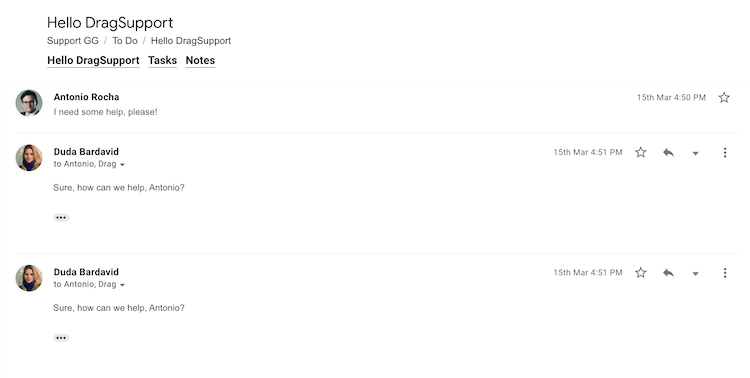
Cause 1: replying to a Google Group and one of its members together
This happens when the original email came into your Google Group board, and you (or a teammate) replied to several recipients that included the Google Group address or another member of that board (in To, Cc, or Bcc).
You can confirm the reply was sent only once by checking your Gmail Sent folder. What you see are two versions of the same message: the one to the original recipient, and the one to the other board members in the thread.
Because the email is already on a shared board that your team can see, you do not need to add other Google Group members to your replies. Reply to the original sender as normal, and your team already has access. To get a teammate's attention, @mention them instead.
Cause 2: recipients are aliases of each other
If your reply includes an address that is registered as an alias of another recipient, Gmail sends the message to both, so it loads twice: once to the address, once to the alias that redirects to that same address.
To check for aliases, open Gmail Settings, then Accounts, and look at the Send mail as section.
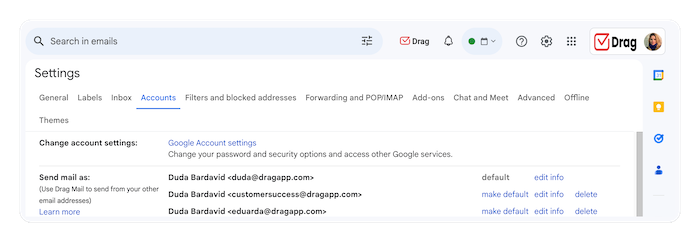
To avoid it, send to either the address or its alias, not both, or remove the alias in your Gmail settings.