Drag needs certain permissions to your Google account to work. You grant them when you sign in, and Drag only requests what it needs to run the product.
Available on: Chrome extension · Web app · Desktop app
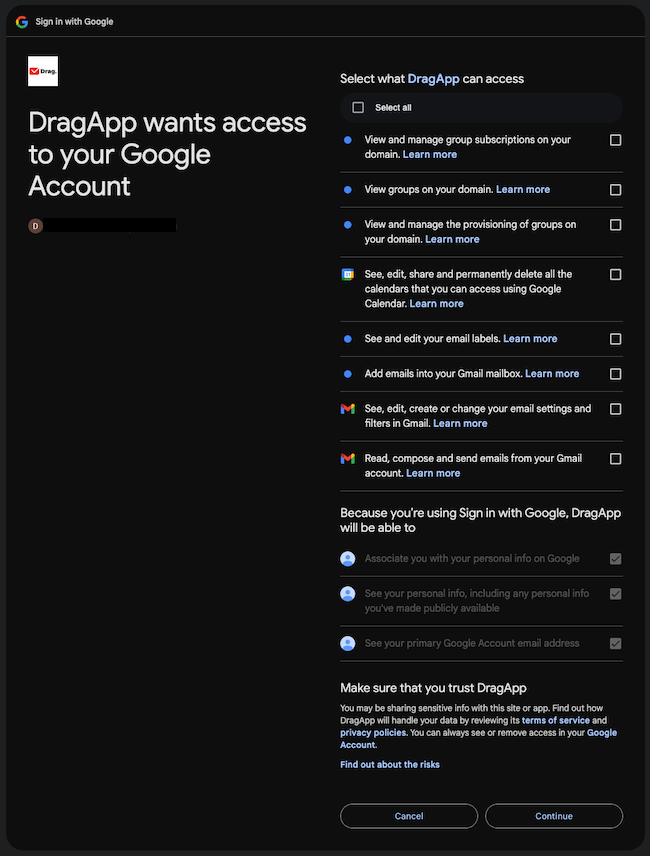
What each permission is for
- Sign you in and see your basic profile. Confirms who you are and shows your name and email.
- Read, organize, compose, and send your email, and manage labels. This is the core of Drag: it powers your boards, moving and organizing cards, and replying and sending from Drag. Deleting a card moves the email to your Gmail Trash (where Gmail removes it after 30 days); Drag does not permanently delete email on its own.
- Manage basic Gmail settings and filters. Used for features like reply as a shared address, and for routing incoming mail to the right shared inbox or Google Groups board instead of an individual inbox.
- Add messages to your mailbox. Lets Drag load shared emails onto the correct boards.
- Access your Google Calendar. Powers due dates and calendar events.
- Access your Google Workspace groups. Used to set up and run Google Groups boards.
Note: If you decline these permissions, Drag cannot run and you will not be able to use its features.
How we keep this safe
- We disclose what we collect, and how we use, protect, and share it, in our privacy policy.
- We are audited yearly by an independent security company appointed by Google, which confirms we only request permissions that are strictly necessary. We can share our latest certificate on request at support@dragapp.com.
- You can revoke Drag's access at any time from your Google account permissions, and request deletion of your data at any time.
See how security is managed on DragApp services and does Drag store my emails for more.